CARLA Web Viewer
실시간 자율주행 시뮬레이션 3D 웹 시각화 플랫폼
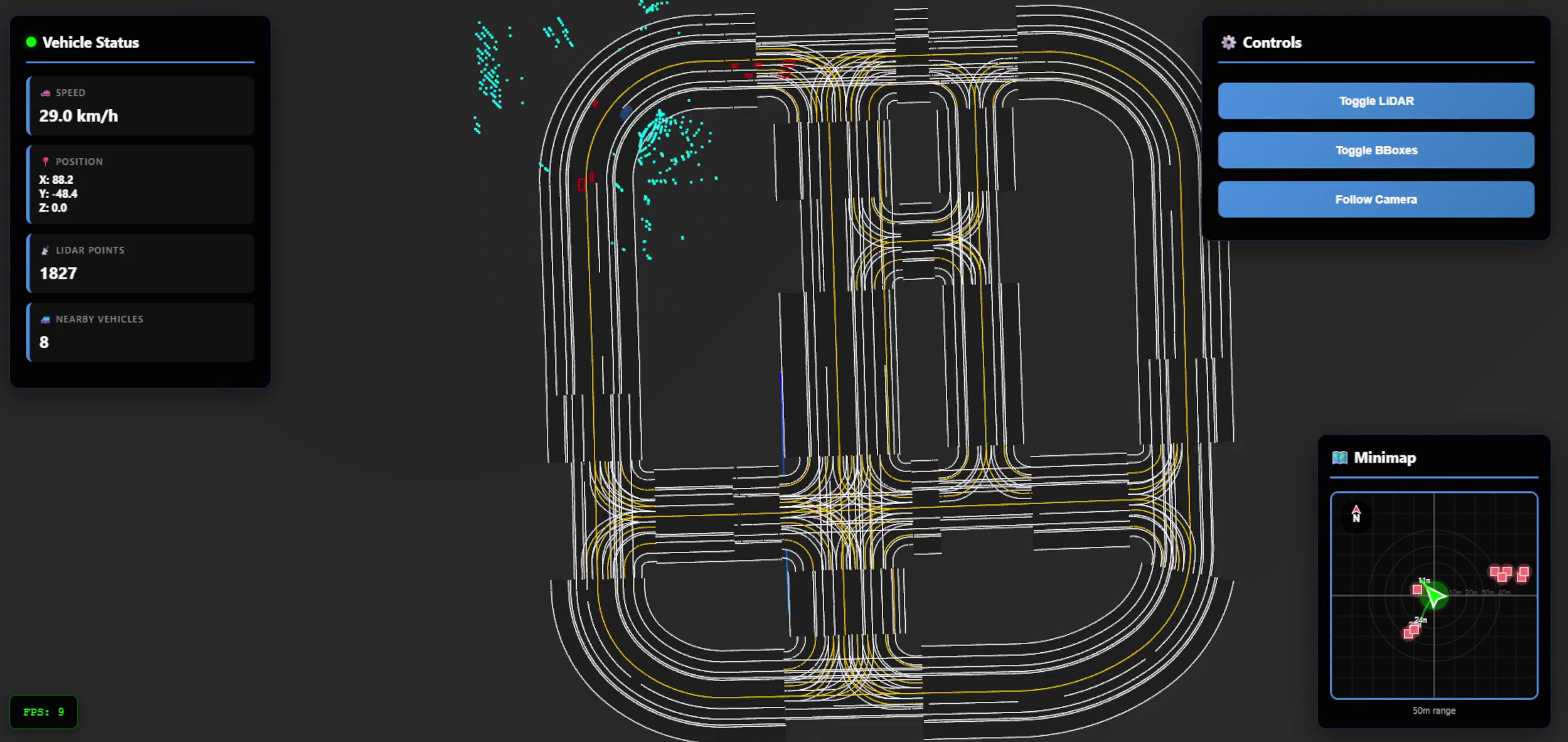
차량과 LiDAR 포인트 클라우드가 보이는 메인 화면
조 윤범
프로젝트 개요
"왜 이 프로젝트를 만들었나?"
문제 상황
- CARLA 시뮬레이터는 강력하지만 데이터 확인이 어려움
- 별도 툴 설치 없이 센서 데이터를 실시간으로 보고 싶었음
- 자율주행 개발 시 디버깅과 모니터링의 필요성
해결 방안
- 웹 브라우저만으로 실시간 3D 시각화
- LiDAR, 카메라, 차량 정보를 한눈에
- 어디서든 접근 가능한 웹 기반 플랫폼
graph LR
A[CARLA Simulator] -- Python API --> B[Python Server]
B -- WebSocket Protocol --> C[Web Frontend]
시스템 아키텍처
"3-Tier 실시간 데이터 파이프라인"
graph LR
subgraph A[CARLA (Unreal Engine)]
A1[CARLA Simulator]
end
subgraph B[Python (WebSocket)]
B1[Python Server]
end
subgraph C[Web (Three.js)]
C1[Web Frontend]
end
A1 -- 센서 데이터 생성 --> B1
B1 -- 데이터 수집 & 변환 --> C1
style A fill:#e1f5fe,stroke:#333,stroke-width:2px
style B fill:#e8f5e9,stroke:#333,stroke-width:2px
style C fill:#fff3e0,stroke:#333,stroke-width:2px
핵심 포인트
- 동기 모드로 프레임 동기화 (20Hz)
- 비동기 WebSocket으로 부하 분산
- 좌표계 변환 및 데이터 최적화
기술 스택
"선택한 기술과 그 이유"
Backend (Python)
CARLA Python API- 시뮬레이터 제어asyncio/websockets- 비동기 실시간 통신NumPy- 대용량 센서 데이터 처리
Frontend (JavaScript)
Vite- 빠른 개발 환경Three.js- 3D 렌더링 라이브러리Canvas API- 2D 미니맵
Data Format
OpenDRIVE XML- 표준 도로 맵 포맷JSON- 실시간 데이터 전송
핵심 기능 1 - LiDAR 시각화
"LiDAR 포인트 클라우드 실시간 렌더링"
기술적 도전
- 초당 90,000개 포인트 → 브라우저 과부하
- 좌표계 변환 (Carla ≠ Three.js)
- 실시간 업데이트 성능 저하
해결 방법
- 거리 필터링 (1m ~ 50m)
- 랜덤 샘플링 (최대 5,000개)
- 업데이트 주기 제어 (100ms = 10Hz)
- 높이 기반 컬러맵 - HSL 컬러로 직관적 깊이 표현
샘플링 로직
# Python (carla_client.py)
points = np.frombuffer(lidar_data.raw_data, dtype='f4')
points = np.reshape(points, (int(points.shape[0] / 4), 4))

# 거리 필터링
distances = np.sqrt(points[:, 0]**2 + points[:, 1]**2 + points[:, 2]**2)
valid_mask = (distances > 1.0) & (distances < 50.0)
points = points[valid_mask]

# 샘플링
if len(points) > 5000:
    indices = np.random.choice(len(points), 5000, replace=False)
    points = points[indices]
90K → 5K 포인트
100ms 업데이트 주기
부드러운 렌더링
핵심 기능 2 - 좌표계 변환
"두 세계를 연결하다 - 좌표계 변환"
문제 상황
- CARLA: 좌측 손 좌표계 (Unreal Engine)
- Three.js: 우측 손 좌표계 (WebGL)
- 단순 매핑 시 차량이 이상하게 회전
해결 과정
- 축 매핑 분석 - Carla (x, y, z) → Three.js (?, ?, ?)
- 변환 공식 도출
x_three = y_carla / 100 y_three = z_carla / 100 z_three = -x_carla / 100 - 회전 보정 -
yaw_three = -yaw_carla + 90° - 모든 오브젝트에 일관되게 적용 - 차량 ✓ LiDAR ✓ Bounding Box ✓ 맵
핵심 기능 3 - OpenDRIVE 파싱
"표준 맵 포맷 완벽 구현"
OpenDRIVE란?
- 자율주행 산업 표준 도로 맵 포맷
- 복잡한 기하학과 레이어 정보 포함
구현한 기하학 타입
Line
Arc
Spiral
Poly3
ParamPoly3
파싱 → 렌더링 과정
- XML 파싱 (DOMParser)
- 기하학별 포인트 변환 (150개/구간)
- Lane 정보 추출 (폭, 타입, 마킹)
- 3D 메쉬 생성 - 도로 표면, 차선 (실선/점선), 중앙선
핵심 기능 4 - Z-Fighting 해결
"픽셀 단위의 디테일 - Z-Fighting 방지"
문제
- 도로 레이어들이 겹쳐서 깜빡임 현상
- 시각적으로 매우 불편함
해결 전략
- 레이어별 높이 분리 (mm 단위)
ground: 0.000m roadSurface: 0.002m roadEdge: 0.004m centerLine: 0.006m laneMarking: 0.008m - renderOrder 설정 - 도로(0) < 차선(10) < 마킹(20)
- polygonOffset 활용 - 하드웨어 레벨 깊이 보정
결과: ✨ 깔끔한 도로 렌더링
실시간 성능 최적화
"쾌적한 렌더링을 위한 최적화"
최적화 포인트
🎯 데이터 레벨
- LiDAR: 90K → 5K 포인트
- 업데이트: 100ms 주기
- 거리 필터: 1m ~ 50m
🎯 렌더링 레벨
- BufferGeometry 사용
- needsUpdate 플래그
- Frustum Culling 활용
🎯 네트워크 레벨
- WebSocket 양방향 통신
- JSON 직렬화 최적화
- 비동기 메시지 처리
최적화 효과
- 데이터 전송량: ✅ 94% 감소 (90K → 5K)
- 렌더링: ✅ 부드러운 프레임 유지
- 레이턴시: ✅ ~100ms (실시간 대응 가능)
주요 기능 데모
"실제 작동 화면"
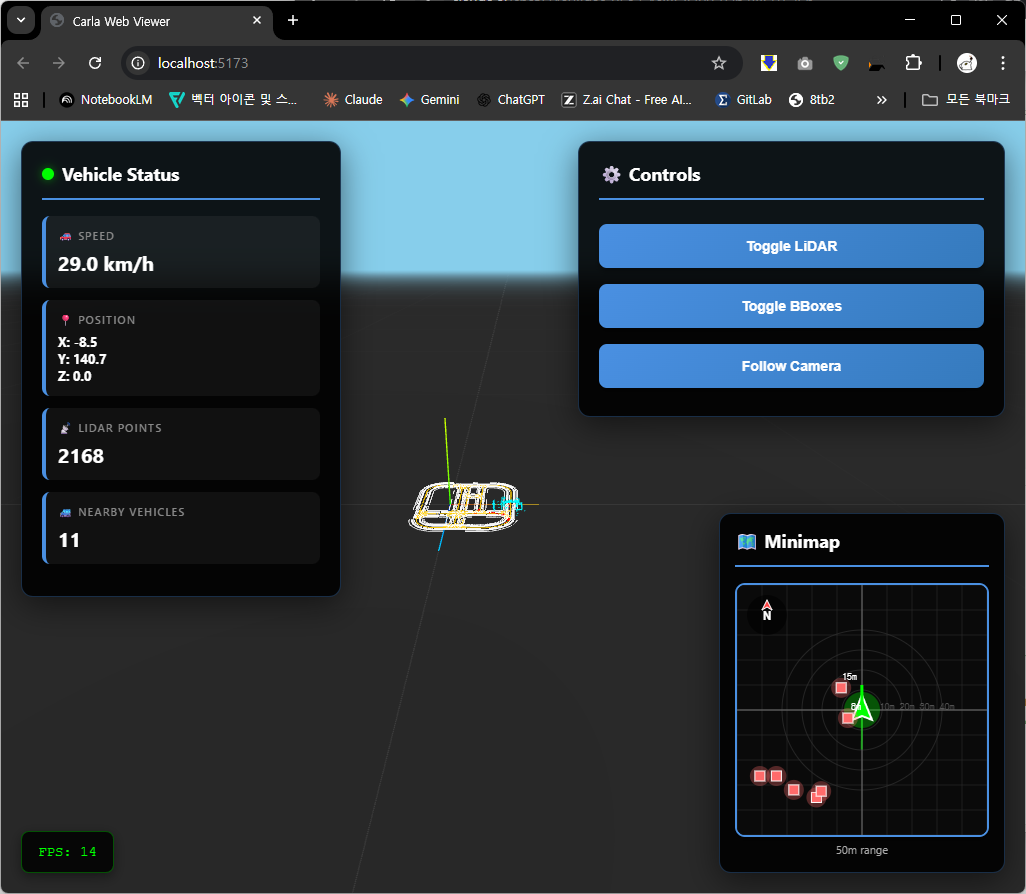
메인뷰 (3D 렌더링)
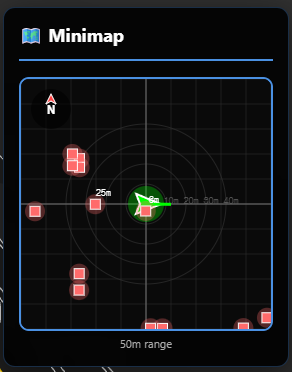
미니맵 (2D 오버뷰)
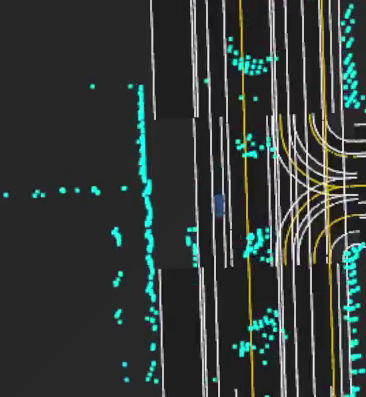
LiDAR (포인트클라우드)
BBox (차량감지)
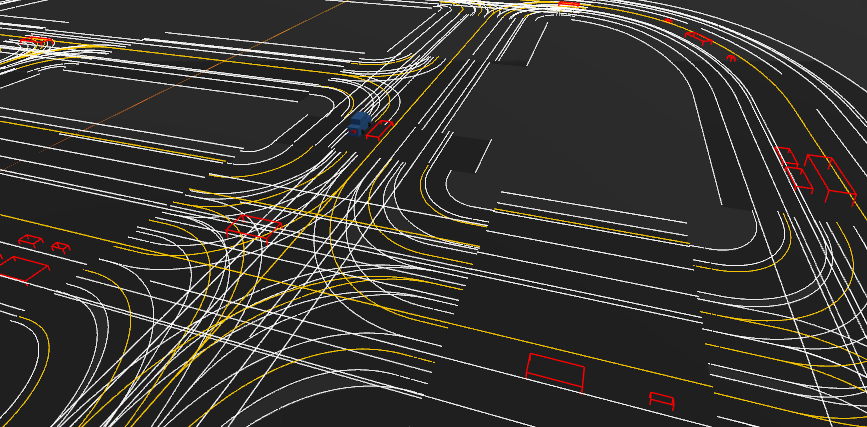
주요 UI
- 실시간 차량 상태 (속도, 위치, 회전)
- LiDAR 포인트 개수
- 주변 차량 수
- 토글 버튼 (LiDAR/BBox/카메라)
코드 하이라이트 1
"핵심 코드 - LiDAR 업데이트"
// sensors.js - LiDAR 포인트 변환
update(lidarData, vehiclePosition, vehicleRotation) {
    // 1. 차량 위치 변환
    const vehiclePos = new Vector3(
        vehiclePosition.y / 100,
        vehiclePosition.z / 100,
        -vehiclePosition.x / 100
    );

    // 2. 차량 회전을 쿼터니언으로
    const quaternion = new Quaternion();
    quaternion.multiply(qYaw).multiply(qPitch).multiply(qRoll);

    // 3. 각 포인트 변환
    lidarData.points.forEach((point, i) => {
        const pointVector = new Vector3(
            point[1] / 100,
            point[2] / 100,
            -point[0] / 100
        );

        pointVector.applyQuaternion(quaternion);  // 회전 적용
        pointVector.add(vehiclePos);              // 이동 적용

        // 높이 기반 컬러링
        const hue = (point[2] + 200) / 400;
        const color = new Color().setHSL(hue, 1, 0.5);
    });
}
포인트: 회전 먼저, 이동은 나중에 (행렬 연산 순서)
코드 하이라이트 2
"핵심 코드 - OpenDRIVE Arc 파싱"
// opendrive_parser.js - 원호 도로 처리
arcToPoints(geometry, numPoints) {
    const curvature = geometry.params.curvature;
    const radius = 1.0 / curvature;

    // 원의 중심 계산
    const centerX = geometry.x - radius * sin(geometry.hdg);
    const centerY = geometry.y + radius * cos(geometry.hdg);

    for (let i = 0; i <= numPoints; i++) {
        const ds = (i / numPoints) * geometry.length;
        const angle = curvature * ds;  // 진행 각도

        // 회전 변환 행렬
        const dx = radius * sin(angle);
        const dy = radius * (1 - cos(angle));

        // 초기 방향 고려한 최종 위치
        const x = geometry.x +
                  dx * cos(hdg) - dy * sin(hdg);
        const y = geometry.y +
                  dx * sin(hdg) + dy * cos(hdg);

        points.push({ x, y, s: geometry.s + ds });
    }
}
포인트: 기하학 공식의 정확한 구현이 부드러운 곡선을 만듦
어려웠던 점과 해결
"마주한 도전과 극복 과정"
1️⃣ 동기화 문제
문제: CARLA와 Three.js 프레임 불일치
해결: CARLA 동기 모드 + tick() 기반 업데이트
2️⃣ 메모리 누수
문제: 차량 생성/삭제 시 메모리 증가
해결: actors_to_destroy 리스트로 명시적 cleanup
3️⃣ 회전 방향 불일치
문제: 차량이 반대로 향함
해결: yaw 각도에 -1 곱하고 90도 오프셋
4️⃣ NPC 차량 인식 안됨
문제: bbox가 제대로 안보임
해결: bbox.extent 사용 + 회전 적용
5️⃣ 맵 로딩 실패
문제: 복잡한 기하학 파싱 오류
해결: 타입별 분기 처리 + Fallback 맵
작은 문제들의 누적이 큰 기능을 만든다
개선 사항 및 확장 가능성
"다음 단계로..."
현재 구현된 기능
LiDAR 시각화
Bounding Box
OpenDRIVE 맵
미니맵
실시간 통신
🎯 단기 (1-2주)
- 카메라 이미지 오버레이
- 레코딩/재생 기능
- 다중 센서 동시 표시
🚀 중기 (1-2개월)
- 궤적 예측 시각화
- 시나리오 편집기
- 성능 메트릭 대시보드
🌟 장기 (3개월+)
다중 차량 동시 모니터링
클라우드 스트리밍
ML 모델 평가 툴 통합
배운 점
"이 프로젝트를 통해 얻은 것"
기술적 성장
- 3D 그래픽스 이해
- 좌표계, 쿼터니언, 행렬 연산
- Three.js 렌더링 파이프라인
- 실시간 시스템
- WebSocket 비동기 통신
- 성능 최적화 기법
- 표준 포맷 구현
- OpenDRIVE 스펙 분석
- 복잡한 데이터 파싱
소프트 스킬
- 🎯 문제 분해 능력
- 큰 문제를 작은 단위로
- 🎯 디버깅 전략
- 좌표계 시각화로 문제 발견
- 🎯 문서 읽기
- API 문서, 표준 스펙 해석
직접 부딪혀보며 진짜 실력이 늘었습니다
프로젝트 성과
"결과와 의미"
정량적 성과
- 코드 규모
- Python: ~400 lines
- JavaScript: ~1,500 lines
- 총 파일: 10개
- 최적화 효과
- 데이터 전송: 94% 감소
- 레이턴시: ~100ms
- LiDAR: 5,000 points/frame
- 기능 구현
- 센서 타입: 2개
- 기하학 타입: 5개
- NPC 차량: 최대 50대
정성적 의미
- ✨ 실무 기술 스택 경험
- ✨ 복잡한 시스템 통합 능력
- ✨ 성능 최적화 경험
- ✨ 표준 스펙 구현 능력
단순한 뷰어를 넘어 실용적인 도구로
데모 영상
"실제 작동 모습"
기술 스택 정리
"사용한 기술 총정리"
Frontend
- Vite - 빌드 도구
- Three.js - 3D 렌더링
- OrbitControls - 카메라 제어
- WebSocket API - 실시간 통신
- Canvas API - 2D 미니맵
Backend
- CARLA API - 시뮬레이터
- asyncio - 비동기 처리
- websockets - WS 서버
- NumPy - 배열 연산
Format & Protocol
- OpenDRIVE - 맵 포맷
- JSON - 데이터 교환
- WebSocket - 양방향 통신
GitHub & 참고자료
"더 알아보기"
GitHub Repository
https://github.com/kurt01124/carla-web-viewer
├── carla_bridge/
│   ├── carla_client.py      # CARLA 데이터 수집
│   └── websocket_server.py  # WebSocket 서버
├── frontend/
│   ├── viewer.js            # 메인 뷰어
│   ├── vehicle.js           # 차량 렌더링
│   ├── sensors.js           # 센서 시각화
│   ├── map.js               # 맵 렌더링
│   └── opendrive_parser.js  # OpenDRIVE 파싱
└── README.md
참고한 자료
- CARLA Documentation
- Three.js Documentation
- OpenDRIVE Format Specification
- WebGL Best Practices
감사합니다
CARLA Web Viewer 프로젝트 발표를 마치겠습니다
프로젝트 링크
연락처
kurtz01124@gmail.com
질문이 있으시면 편하게 연락 주세요